Skip to content
BookFoundry
For finished drafts, written here or imported

AI Book Editor That Reads Your Whole Book

BookFoundry's AI book editor is where your book lives once it is written or imported. You change any word by hand, for free, and you can ask for readings of the whole book.

One reading finds where your book says two different things and quotes both passages. One maps who knows what in every scene. One writes you an editorial letter. Seven run in your browser and call no AI at all.

Paid readings show their price before they run. Nothing in your book changes unless you take it.

sections above your text
5
readings that call no AI
7
interface languages
18
How it is laid out

Five sections above your text: Write, Explore, Check, Improve, Export

The tools for the whole book sit behind five words above your chapter. Each opens in a drawer beside the text, on a card that says what you get, whether your book changes, what it needs first and what it costs. Alt+1 to Alt+5 open them, or βŒ₯1 to βŒ₯5 on a Mac.

The editor asks once what kind of book this is, and a tool that does not fit shows as unavailable, with the reason.

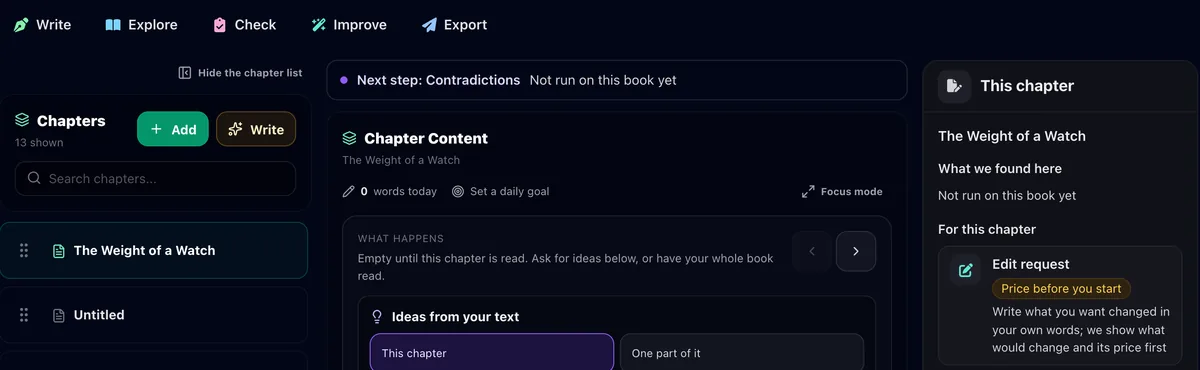
The editor on a 1440 pixel screen: the five sections above the text, the chapter list, the chapter in the middle and the This chapter column beside it.
On a wide screen, This chapter sits beside the text.

Write

Add to your book, or keep a copy of it to come back to.

  • New chapter. A chapter in your book's own voice. Its plan is free to read and edit, and the chapter is charged only after it passes every check.
  • Replace in book. A name or a word changed in every chapter at once, for free, with one undo for all of it.
  • Figures and tables. Charts and tables drawn from the text of a non-fiction book, with a free preview first.
  • Versions. Saved copies you can lock, restore, branch into a new book or export from. What changed compares one with the book as it is now.
Explore

Describes your book without judging it.

  • Book in numbers. Chapter and sentence lengths and the share of dialogue.
  • Book map. On novels and screenplays: what the reader knows in each scene, beside a chart of your chapter lengths. It needs a Who knows what reading.
  • Characters and places. For a novel or a story collection: every name in it and where it appears, with corrections you make yourself.
  • Timeline. When each chapter happens, from the time phrases your book states.

Check

Looks for problems before a reader finds them.

  • Contradictions. Facts your book states two ways, with both sentences.
  • What we found. The findings of the last checks, each with an action that shows its plan first and changes nothing until you press it again.
  • Story review. Threads left open, promises to the reader not kept, and notes on craft.
  • Pacing and structure. Opens Manuscript Analysis, with its free layer of counts.
  • Who knows what. What each person and the reader know, scene by scene.
  • Voice consistency. The paragraphs that drift from your style.
  • Repetition. The words you repeat, and two chapters that do the same work.
  • Series consistency. What contradicts your earlier books in a series.

Improve

Changes whose price you see before you agree to them.

  • Edit request. Your own words become a plan with its price. Nothing happens until you agree.
  • Imported text repair. On an imported book, sound text in place of words a PDF or a scan broke.

Export

Take your book to readers. Nothing here changes your text.

  • Download. Word, PDF and EPUB files. Exporting spends no credits.
  • Translation. A full copy of your book in another language.
  • Audiobook. Your book as audio.

Or type what you want to do

A field at the top of the editor takes your own words in any of the 18 interface languages and lists the tools that fit, with their section and price. Opening a tool is free. Describe a change and a β€œDo it” row takes it to the edit request, which shows the plan and price first. Enter only opens tools, so it never spends a credit. ⌘K on a Mac, Ctrl+K elsewhere.

On a phone

Below 1024 pixels wide, the five sections move to a bar at the bottom of the screen. The book's title opens the chapter picker, and every tool opens as a full-screen sheet.

Screens from the live editor, with our own test books open.

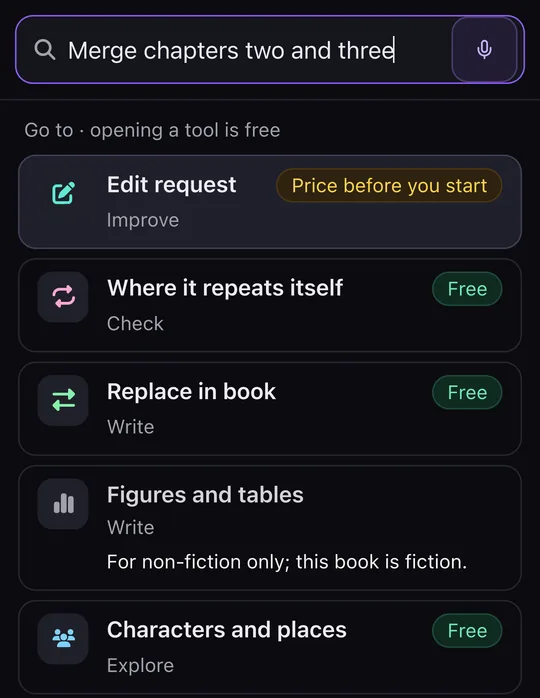
The finder after typing a request to merge two chapters: the tools that fit, each with its section and a label saying it is free or priced before you start.
The finder lists the tools that fit, with their section. Opening one is free.
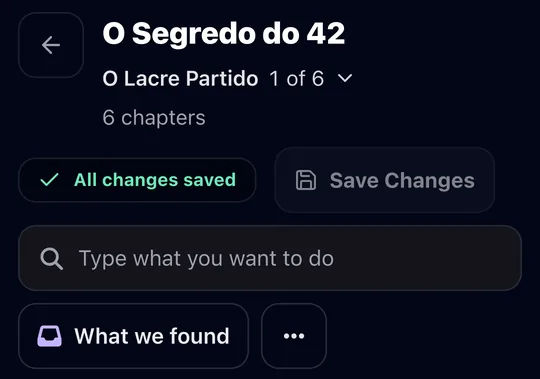
The top of the editor on a phone: the book's title and chapter picker, Save Changes, the field to type what you want to do, and What we found.
The top of the editor: the chapter picker, Save Changes, the finder and What we found.
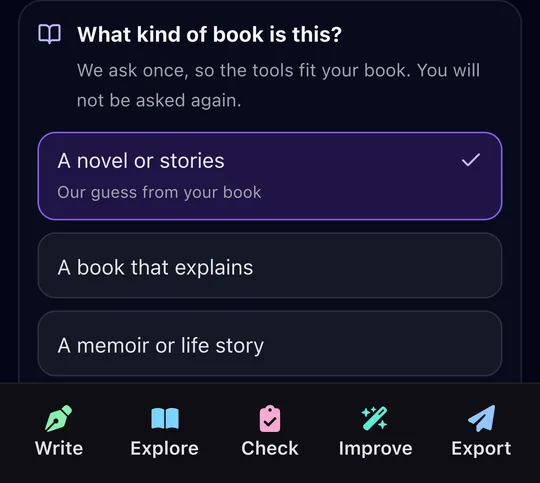
The one-time question about what kind of book this is, above the bar with the five sections: Write, Explore, Check, Improve and Export.
The five sections in the bar at the bottom, under the one-time question about what kind of book this is.
Free, and no AI

Seven readings that run in your browser and call no AI

Seven of the editor's readings are arithmetic. Your browser runs them over your own words: no model is called, nothing is charged, nothing in the book is written. Four of them read any kind of book, non-fiction included: Voice consistency, Repetition, Where it repeats itself and What changed. Timeline, Series consistency and Your book from start to end do not read non-fiction, and on a book one does not fit, the editor shows it as unavailable with the reason.

  1. Voice consistency

    Ranks the paragraphs that drift from your own book's style, never anybody else's. With a reading you own that names each scene's point of view, it also shows a scene slipping into another person's head, if unchanged since.

  2. Repetition

    A word used past your habit, a phrase you keep returning to, two things said close together, and words that gather around your dialogue. If the book is too short for one of these, it says so.

  3. Where it repeats itself

    Two chapters that do the same work, measured chapter against chapter.

  4. Timeline

    Lays your chapters on a clock from the time phrases the book states, and points out an age that does not add up. It reads time phrases in English and Arabic, and not Hijri dates.

  5. What changed

    A saved version set beside the book as it stands now, sentence by sentence.

  6. Your book from start to end

    What the reader comes to know, chapter by chapter, with the chapters that bring nothing new and the threads never closed. It needs a Who knows what reading, so it works on novels and screenplays, and tells you what one would cost first.

  7. Series consistency

    For a series: a character described two ways across two books, with the sentence from each. You can mark something as meant to change. It reads the contradiction checks already run on each book.

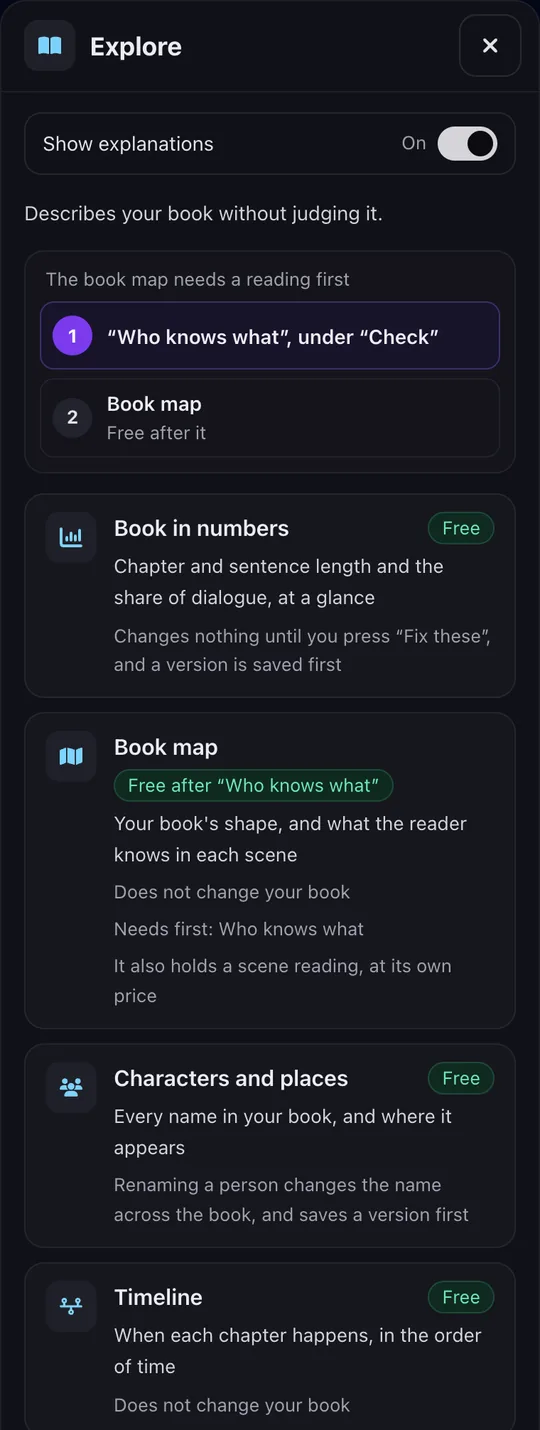
The Explore section open beside the text, listing Book in numbers, Book map, Characters and places and Timeline, each card saying what it gives and whether it is free.
Every card says what it costs before you open it.
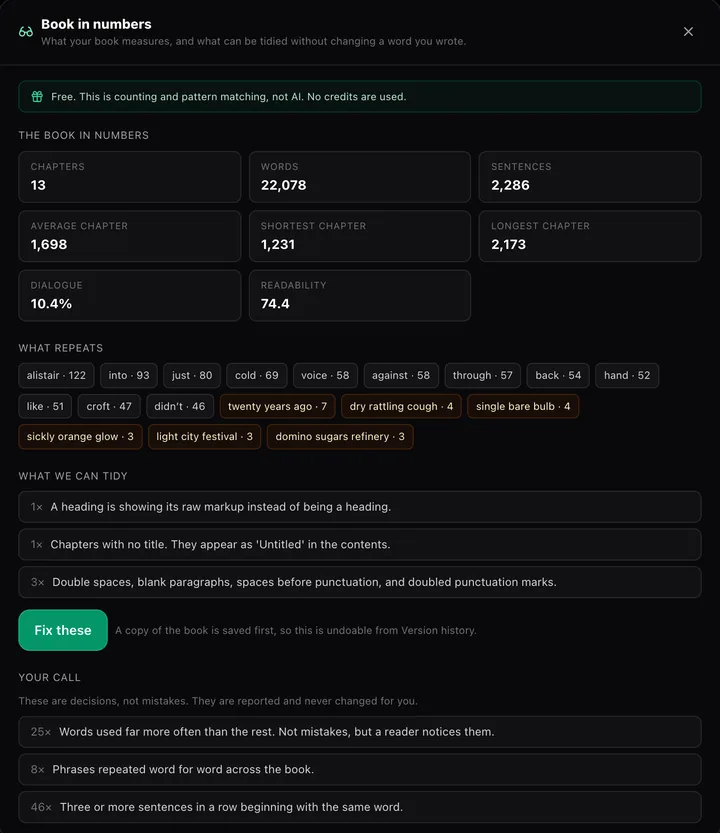
Book in numbers for one of our test novels: chapters, words, sentences, chapter lengths, the share of dialogue, repeated words and phrases, and what it can tidy with a version saved first.
Counting, not AI: no credits are used.
Check

The contradiction check quotes both passages

Long books drift. A sister is older than her brother in chapter 3 and younger in chapter 20. The contradiction check reads the whole book and reports where it says two different things about the same person or fact.

An example
Chapter 3

β€œMara was two years older than Tom, and she never let him forget it.”

Chapter 20

β€œTom, two years her senior, had always looked out for Mara.”

Every finding quotes both passages word for word, with their chapters, and a quote not found exactly in your text is dropped. Differences judged explainable are listed apart with the reason, so an empty result can be checked, not trusted.

It never writes into your book. A free quote with the price comes first. The run carries on if you close the page, and a run that cannot finish is refunded. After you edit, you can check only the chapters that changed and pay only for those. One run reads up to 350 chapters and 400,000 words.

It finds one kind of mistake: the book disagreeing with itself in a way two sentences can show. It does not judge pacing, motives or whether a scene works.

After a check, What it says about each name lists every statement about each person, free, and This chapter shows the findings that quote the chapter you are in, with Show in the text.

Read how the continuity check works

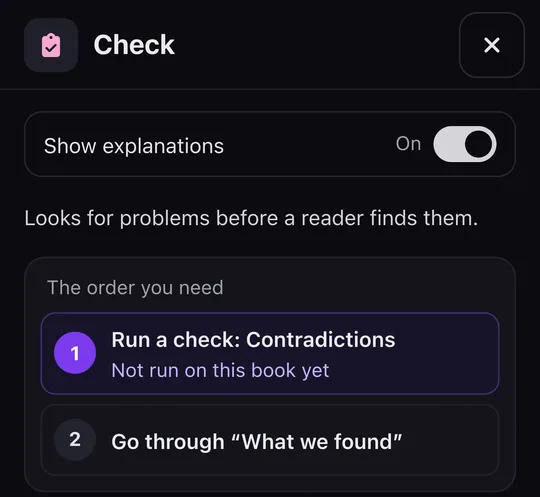
The Check section on a phone: a short line on what it does, then the order to follow, first the contradiction check and then What we found.
The Check section puts the contradiction check first and What we found second.
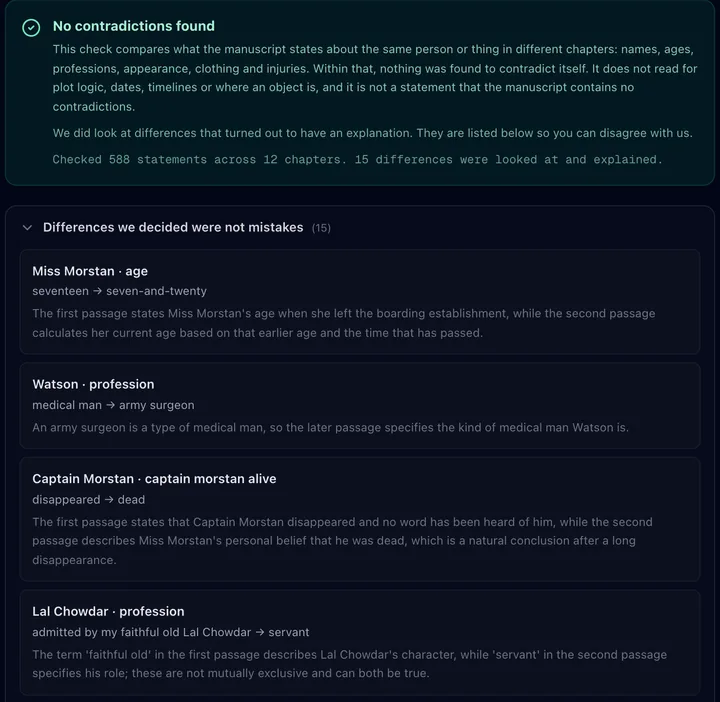
A contradiction check result on the public-domain novel The Sign of the Four: no contradictions found, the scope of the check stated, and the differences it judged explainable listed with the reason for each.
A real check on a public-domain novel, with its explained differences.
Explore

Characters and places, and the Wall

Characters and places reads novels and story collections. It lists the people, places and terms in your book and where each appears. You correct it with one of five answers: add someone it missed, this is someone else, this is not in my book, one person under two spellings, or one name used for two people.

Each correction goes into the book's saved reading, which the list, the Wall and later writing all read. A version is saved first, so restoring it undoes the correction. None of the five rewrites a sentence.

While a novel is still being written into the book, corrections wait until it has finished.

Inside it, the Wall, β€œYour book says two different things”, lists each fact the reading holds two values for. β€œThis one is right” keeps one. β€œBoth are true, it changed” keeps both, each for its part of the book. β€œThis is not a contradiction” closes the question, and later chapters are written knowing both hold. Written chapters stay as they are, and β€œAsk me again” reopens it.

Free

Download a reading as PDF or Word, free

Three readings have Download as PDF and Download as Word buttons: the scene table, a chapter's feedback and the editorial letter. Downloading costs no credit, calls no AI, and works for readings you already have.

The file holds exactly what the screen shows. Arabic runs right to left in an Arabic font, and Chinese, Japanese and Korean are supported. Each page carries a small dated footer, the file names no account or book id, and a reading made before your book changed says so.

The scene table also downloads as CSV.

Your decision

Nothing changes in your book unless you take it

Readings report and stop. When something does change your text, you see it first and you choose.

  • Change this chapter applies only the sentences you take.
  • An edit request turns your words into a plan with its price, and nothing happens until you agree. Its changes are listed under Changes, which opens the version saved before each one.
  • Replace in book shows every place in its sentence before anything changes, and one undo puts back the exact text.
  • A new chapter, a merge, a split, a replace and a character correction each save a version first.
  • The chapter editor does not save on its own. A chapter is saved when you press Save Changes, and closing the tab with unsaved text asks you first.
  • Only Change this chapter marks text. When you take one of its suggestions, each sentence it wrote in its own words is marked beside the text in your editor. The mark is never written into your text or exported, and a sentence you edit loses it.

If a tool fails, the message to support is already written for you, naming the tool, the book and a short code in your language, and you can change every word before sending.

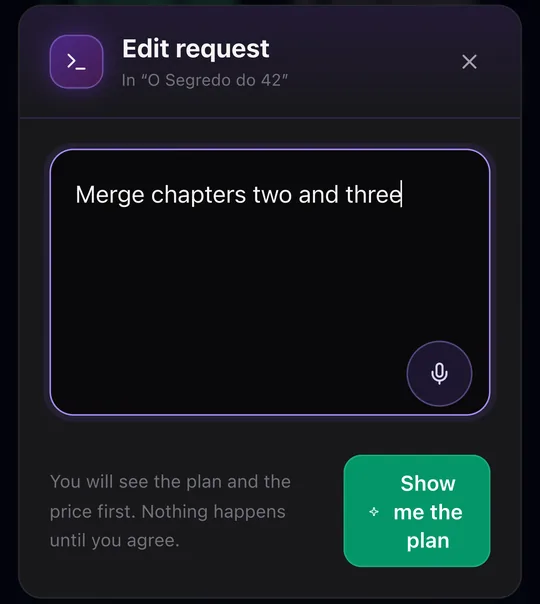
An edit request on a phone with a request to merge two chapters typed in, a note that the plan and the price come first, and the button that shows the plan.
An edit request shows the plan and the price before anything happens.
Languages

18 interface languages, and Arabic right to left

Every word of the editor is in 18 interface languages, including the ? help on every tool and its glossary. The finder understands what you type in any of them.

The studio's paid readings work on books in any of the 18 book languages, and a book in a language they cannot read is told so before any price.

Arabic gets care of its own. PDF and Word downloads run right to left. Replace in book matches an Arabic word with or without its vowel marks, tatweel and accusative ending, never folding one letter into another. The Timeline reads English and Arabic time phrases.

The interface languages are English, Arabic, Spanish, Portuguese, French, German, Italian, Dutch, Swedish, Norwegian, Danish, Finnish, Polish, Turkish, Russian, Japanese, Chinese and Korean.

Imports

It works on a book you wrote somewhere else

You do not need to have written the book here. Import a Word file, EPUB, PDF, Markdown, plain text or HTML up to 50 MB and it opens in the same editor. The import shows its price before anything is charged.

On an imported book you can run the contradiction check, add a new chapter, ask for changes with an edit request, and read it with Manuscript Analysis, whose free layer counts without a model.

Imported text repair, for imported books only, mends words a PDF or EPUB conversion broke, such as spaces inside words. It shows its price before it runs.

Honest limits

What it does not do

  • The studio does not read non-fiction yet. Change this chapter works on novels and memoirs only, and a screenplay is read but not changed.
  • The studio does not reorder chapters or move text between them. You do that yourself in the chapter list, for free, and the new order reaches every export.
  • It is not a spelling and grammar checker for the whole book. To tidy one passage, select it and choose Fix, which shows an estimate of its price on the button and gives you three versions to pick from.
  • It does not upload your book to any store. It makes the files, and you publish them.
  • We publish no accuracy percentage for any reading. A number measured on test books would read as a promise about yours.
Comparison

How it compares with other AI editing tools

What each product says on its own public page, read on 22 October 2026. The page each line comes from is linked under the product's name. Products change, so check before you decide.

BookFoundry's AI book editor compared with ProWritingAid, AutoCrit, Marlowe, Inkfluence AI and River, from each product's own public page on 22 October 2026
ProductWhat it readsLetter or reportFree way in
BookFoundryThe whole book: contradictions quoted from both chapters, who knows what in each scene (novels and screenplays), a story review, a scene tableAn editorial letter on the whole book, with free PDF and Word downloadsOn a book already in the editor: the readings that call no AI, Replace in book, and Characters and places for novels
ProWritingAidprowritingaid.com/developmental-editorUp to 300,000 words: plot holes, timeline errors, world-building consistency, pacing and charactersA review of the whole manuscript for each credit, its feedback prioritized by importanceA free account; the analysis needs credits
AutoCritautocrit.comStory Analyzer+: pacing, character inconsistencies, plot threads and world-building errors; a Series Analyzer; 25+ line reportsFull summaries of strengths and weaknesses (Story Analyzer+)A free-forever account
Marlowe (Authors A.I.)authors.aiPlot and pacing, characters and dialogue, themes, a structure checklist and revision prioritiesReports, including a Market Fit reportMarlowe Basic, free
Inkfluence AIinkfluenceai.com/ai-book-editorA chapter review that quotes 4 to 15 words and grades each finding; 7 actions on a selectionA whole-book editorial letter of 250 to 400 words, up to 40 chaptersA free tier, no card
Rivermeetriver.com/tools/plot-hole-findermeetriver.com/tools/ai-book-editorA plot hole finder over the whole manuscript: facts, timeline, who knows what, world rules and dropped threads, with both lines quotedAn editor's letter; one chapter at a time gives the sharpest notesFree to start, no card
Questions

Questions writers ask about the AI book editor

What is an AI book editor?

On BookFoundry it is the editor every finished book opens in, written here or imported. You edit by hand for free and can ask for readings of the whole book, from contradictions quoted from both chapters to an editorial letter. Seven readings call no AI.

Will it rewrite my book without asking?

No. Readings report and stop. Anything that changes your text shows you the change first, and only what you take is applied.

What can I do for free?

Editing by hand, Replace in book, Versions, Book in numbers, Characters and places on a novel or story collection, the seven browser readings, opening any tool, and PDF or Word downloads of readings you have. Exporting spends no credits either.

How much does a paid reading cost?

It depends on your book and the reading, so this page prints no number. The editor shows the price before the reading runs, and in the studio it is returned if nothing is delivered. Credits never expire, and there is no subscription on the web.

Does it find every plot hole?

No. The contradiction check finds two statements that disagree and quotes both. Story review names threads left open and promises not kept. Neither judges whether every scene works, and an empty result is not proof the book is consistent.

Can I use it on a book I wrote somewhere else?

Yes. Import a Word file, EPUB, PDF, Markdown, plain text or HTML, and the contradiction check, a new chapter, the edit request and Manuscript Analysis all work on it.

Which languages does it work in?

The editor speaks 18 interface languages, and studio readings work on books in all 18 book languages. PDF and Word downloads run right to left for Arabic.

Does it work for non-fiction?

Partly. Voice consistency, Repetition, Where it repeats itself, What changed, Replace in book, Versions, a new chapter and the contradiction check work on non-fiction, and Figures and tables is for non-fiction only. Timeline, Series consistency, Your book from start to end, Characters and places and Who knows what do not read it, and neither do the studio's paid readings yet. The editor says so before any price.

Open your book and read it back

Every finished book on BookFoundry opens in this editor. Start with the free readings, and see the price of anything else before you decide.

Related pages